Blog

  • Rocky Linux/RHEL 10: Fixing “Invalid UID in persistent keyring name” with AD and SSSD

    I run a Samba Active Directory in my homelab, with a Wireguard VPN to my dad’s house between my and his MikroTik routers.

    I recently reinstated the HPE ProLiant ML30 Gen9 running Rocky Linux 10 colocated at his house. With that, I rejoined the server to a new AD domain I made. I wasn’t able to log in, since the SSSD cache doesn’t get flushed.

    While I used this guide on Rocky Linux, it should be the same on AlmaLinux, CentOS or RHEL.

    Going back, the error I got was:

    Feb 13 15:11:01 oldsai.sc.lan krb5_child[2258]: Invalid UID in persistent keyring name
    Feb 13 15:11:01 oldsai.sc.lan sshd-session[2254]: pam_sss(sshd:auth): authentication failure; logname= uid=0 euid=0 tty=ssh ruser= rhost=::1 user=blackbird
    Feb 13 15:11:01 oldsai.sc.lan sshd-session[2254]: pam_sss(sshd:auth): received for user blackbird: 4 (System error)

    To fix this, first stop sssd:

    systemctl stop sssd

    Clear the cache with sss_cache:

    sss_cache -E

    Now remove the stray cache files:

    /var/lib/sss/db/*

    Note: this command is important, as SSSD doesn’t flush caches upon unjoining and rejoining, even with different user IDs.

    Now start sssd:

    systemctl start sssd

    The error should go away. Keep in mind that if UIDs changed for a particular user, you will need to delete or chown their home directory.

    Source. Thanks, Jarrod Farncomb.
  • Creating a Samba Active Directory Domain Controller on FreeBSD

    While I now use Fedora as my main desktop and Rocky Linux as my server OS, there are some things which aren’t in the EPEL. That combined with me not having really used Debian since high school means I set up homelab Samba domain controllers on FreeBSD.

    To set one up, you need a static IPv4 address, and a static IPv6 address if your network is dual-stack. You’ll also need to forward your domain’s DNS zone or set the DC as the DNS server, which is out of the scope for this article.

    When you’re ready, if your DC uses UFS (versus ZFS), you’ll first need to edit /etc/fstab:

    /dev/vtbd0s1a / ufs rw,acls 1 1

    Note, you need the ,acls in order to run a Samba DC, as Samba requires this.

    If you haven’t rebooted, run this:

    mount -a

    Now, install Samba:

    pkg install samba422

    Note: newer versions of Samba may have come out. At the time of posting it’s samba422.

    Next, create the domain:

    samba-tool domain provision --use-rfc2307 --realm=SC.LAN --domain=SC --server-role=dc --dns-backend=SAMBA_INTERNAL --adminpass=PASSWORD

    Replace SC.LAN with the DC’s realm, and SC with the domain’s NetBIOS name.

    Then, enable samba_server and winbindd:

    sysrc samba_server_enable=YES
    sysrc winbindd_enable=YES

    Now, enable Samba:

    service samba_server start

    Keep in mind you’ll need your DNS server set to the AD DC’s static IP, or forward DNS zones. I use a MikroTIk core router, and forward DNS there.

    If your DNS server or forwarding is set, check if you can resolve it:

    # host sc.lan
    sc.lan has address 172.20.0.6
    sc.lan has IPv6 address 2602:XXX:2::6
    #

    Now, you can add users and groups, and join client machines.

  • Implementing Carrier Grade NAT and Port Block Allocation on FreeBSD and PF

    While I don’t run an ISP (unless you consider my hosting company Fourplex an “ISP”), one project I’ve wanted to try in my homelab is implementing Carrier Grade NAT with Port Block Allocation.

    Yes, we all know Carrier Grade NAT sucks. It makes it hard to host services and use console gaming and such. And yes, I haven’t daily driven FreeBSD in years. But FreeBSD is still a good network appliance even if it’s no longer my desktop.

    Note: I won’t describe other parts of the network, like rc.conf IP assignments, IPv6 and routing protocols.

    Ranting aside, first off you need this in /etc/rc.conf:

    gateway_enable="YES"
    pf_enable="YES"

    Subsequently, you need something like this in /etc/pf.conf:

    nat on $ext_if from 100.64.0.0 to any -> 1.2.3.4 port 1000:2999
    nat on $ext_if from 100.64.0.1 to any -> 1.2.3.4 port 3000:5999

    What do these lines mean? I’ll explain:

    • $ext_if is the external interface, which has the public IPs CGNAT will use.
    • 100.64.0.X is the CGNAT IPv4 which will be allocated to a client.
    • 1.2.3.4 is the public IPv4 used by CGNAT.
    • After the port is the start and end IPv4 port ranges respectively, separated by :. For instance, 1000:2999 will assign a start port of 1000 and end port of 2999 to a client.

    You will need a nat line for each CGNAT customer, and can use multiple public IPv4s for different clients.

    What about automating generation?

    I should do it eventually. But since I’m not running a broadband ISP (only a VPS/VPN host) it’s not a priority to script it.

    Yes, I’d love to be an ISP. But only if the FCC would actually mandate “line sharing” rules neither party wants. Or NYC builds an “open access” fiber network which they won’t. I won’t do a WISP for various reasons.

    You could also use VyOS for CGNAT instead of FreeBSD which has CGNAT syntax.

  • MikroTik: Add DNS Forwarding Entry for Active Directory DNS

    Also, why didn’t anyone tell me about match-subdomain=yes?

    For almost two years, my homelab’s core router has been a MikroTik, namely a CCR2004-16G-2S+ and then a CCR2004-16G-2S+PC. I also run a FreeBSD Samba Active Directory domain controller.

    The common ‘solution’ is to use domain wildcard regex and that’s usually not pretty.

    Then I learned about the match-subdomain=yes and it worked wonders, that combined with ttl=0s.

    Keep in mind that by using this guide, I am assuming you’re using the DNS server on a MikroTik router, versus an external resolver.

    If you’re using MikroTik’s resolver, add the following configuration:

    /ip dns static
    add forward-to=IP match-subdomain=yes name=DOMAIN ttl=0s type=FWD

    Replace IP with your DC’s IP address, and DOMAIN with the domain name used by AD.

    Note: you need ttl=0s, otherwise it gets out of sync. match-subdomain=yes is a shortcut Google never told us about (even without “AI” responses), but is ultra useful here.

    If you wish to forward reverse DNS entries, you can do:

    /ip dns static
    add forward-to=IP match-subdomain=yes name=xx.in-addr.arpa ttl=0s type=FWD
    add forward-to=IP match-subdomain=yes name=yy.ip6.arpa ttl=0s type=FWD

    Replace IP with the IP address of the DNS server, and xx (IPv4) and yy (IPv6) with the Reverse DNS zones used by your network.

    This should give you AD DNS using MikroTik’s DNS server.

  • My Homelab and Home Network, January 2026 Edition

    I’ve been running a homelab since October 2013 (I’m good at dates). Back then, I used a special VPN and a homebuilt Pentium 4 desktop.

    Fast forward twelve and a half years, my homelab has significantly changed.

    So what’s in it? I’ll tell you.

    Network

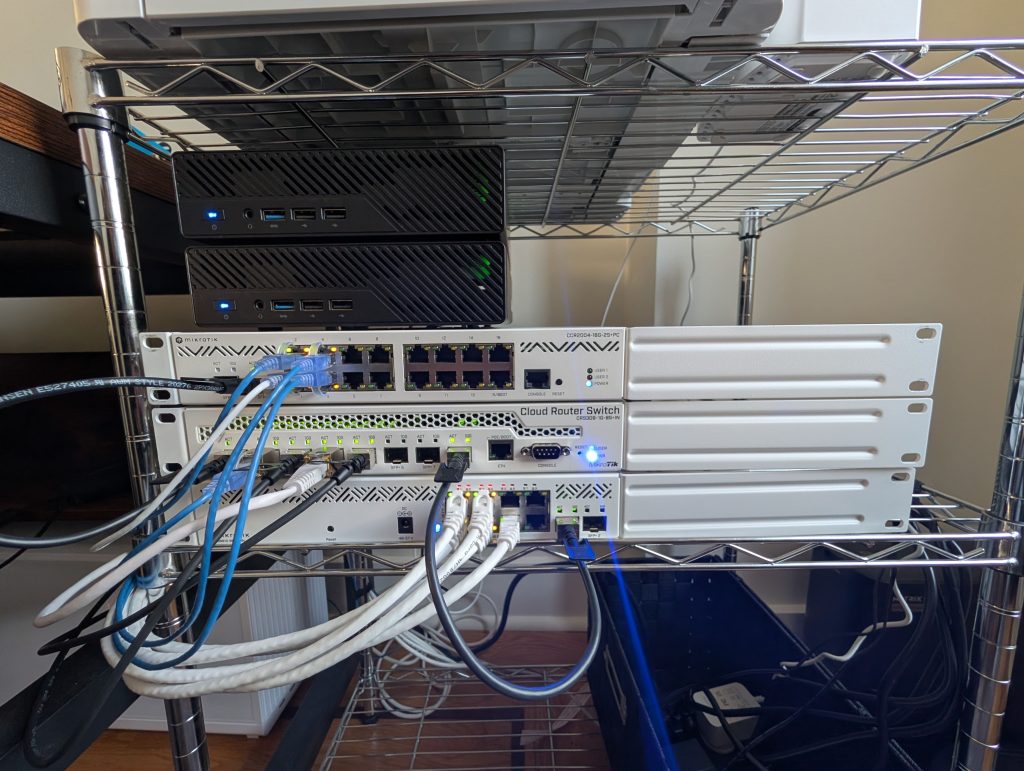
    Right now, I use MikroTik for routing and switching, and UniFi for access points.

    On the top is the core router: a CCR2004-16G-2S+PC which handles L2TP termination, Wireguard, NAT and firewalling.

    The middle is the core switch: a CRS309-1G-8S+IN. This connects to my SFP+ servers via DAC, and 10GbE copper devices via SFP+ modules.

    The bottom is the PoE switch: a CSS610-8P-2S+IN. This connects to four UniFi U6 Pros (indoors) and one U6 Mesh (outdoors)

    The internet connection is not really a traditional ISP like Spectrum or Verizon, but instead a Calyx Sprout SIM. Sprout is an unlocked and unlimited T-Mobile SIM card. I combine that with a L2TP VPN to a BGP VPS to give myself a public IPv4 and IPv6 block.

    The 5G modem is a Hitron D60, of which I disabled Wi-Fi.

    Since I live in NYC and not a RV, I can get Spectrum. But not FiOS or any other fiber ISP, and Spectrum is dragging their feet on high-split. I use Calyx for 75 Mbps upload speeds versus 35.

    Server

    I use two Minisforum MS-01 Mini PCs. Both have i9-13900H CPUs and 96GB RAM, and run Rocky Linux 10.

    The bottom one, “twin” has 2x4TB Crucial SSDs, and the top one, “triplet” has 2x2TB FanXiang SSDs. Both are in RAID 1.

    Twin runs:

    • MariaDB master-master node (Rocky Linux 10, Incus)
    • Nextcloud (Rocky Linux 10, Incus)
    • UniFi Controller (Debian 12, Incus)

    Triplet runs:

    • MariaDB master-master node (Rocky Linux 10, Incus)
    • FreeBSD Ports development (FreeBSD 15, KVM)
    • EVE-NG (Ubuntu 22.04, KVM)

    Sometimes, I also run a Windows 2000 or 2003 VM for the kicks. They usually get deleted in a few days.

    Future Plans

    My last project was to remove noisy components and replace them with “passive” equivalents where possible. However, future plans depend on:

    • Spectrum’s DOCSIS 4.0 upgrades (which keep getting delayed)
    • Whether or not fiber comes (rights of way is hard in NYC)
    • The RAM shortage

    The former two points might mean an upgrade to Wi-Fi 7 (or 8) APs and a UniFi PoE switch instead of the CSS610-8P-2S+IN. MikroTik doesn’t make a multi-Gig PoE switch, so if I did it today, I’d need UniFi.

    The RAM shortage is plain stupid: the RAM industry is putting all their eggs in AI, even when AI is just froth. I just wish someone could fund a DRAM antitrust lawsuit. Heck, I’d love for my startup Fourplex to participate if someone’s willing to fund me (I won’t sue myself).

  • Starting fresh

    In case you haven’t noticed, I’m starting fresh on a new online home: Sour Coffee Labs.

    You may be asking me, why change now? Well, it’s complex.

    But as I’m purging many “Big Tech” surveillance platforms I decided I’m doing a “mental health purge” of my website and email as well.